Installing (inserting) cards
> [HTML Version](dtp-nexgo-pro-vlozeni-sim.html)
| | |
|------|------|
| [] | - Always switch off the device before inserting the cards\! Inserting a card into a switched on device permanently blocks the device, which is not covered by the warranty\!
- We also recommend disconnecting the battery and reconnecting it after inserting the SIM card to be on the safe side.
- When inserting or ejecting the cards, do not use any metal (conductible) or sharp objects. If you accidentally short-circuit or damage the contacts in the slots, the terminal will be permanently damaged, which is not covered by the warranty\! |
**Inserting a SIM / PSAM Card**
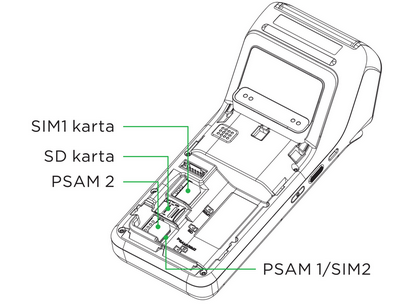
- Before removing the battery cover, [switch off the device](dtp-nexgo-pro-uspani-vypnuti-a-restartovani.md#vypinani). The SIM card slot is located inside the device under the lower battery cover, as are the PSAM1 and PSAM2 slots. Each slot is labelled.
- The appearance of the SAM and SIM slots is the same. There are two slots for SIM and SAM cards.
- The terminal supports only one SIM card size: micro SIM, which exactly fits the size of the slot in the device. Do not insert SIM cards of other sizes into the terminal\!
1. **Switch off the device** and turn it with the back facing up.
2. Slide the battery cover downward to release it.
(./images/clip1466.png)
3. Disconnect the battery connector and remove the battery from the device.
(./images/clip1467.png)
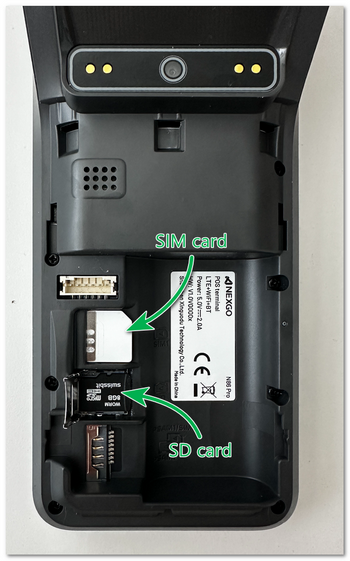
4. Insert the micro SIM card into the slot labelled SIM1. When inserting the cards, make sure that you insert them into the slots in the [correct orientation](#sim) according to their beveled corner (contacts facing down). Insert only cards of the correct size that fit the slot exactly. Never leave a smaller card in the slot. It could get stuck and damage the device.
[]
5. Reconnect the battery connector and insert the battery into the device.
6. Replace the battery cover.
top
# Correct Insertion of the SIM Card
[]
| | |
|------|------|
| [] | If you are inserting only one PSAM card, we recommend inserting it into the **PSAM1** slot. Likewise, if you are inserting only one SIM card, always insert it into the **SIM1** slot. |
top