Starting a turned-off cash register before the season is not rocket science. All you need is a working internet connection, or potentially network coverage in your establishment and a bit of time. This chapter shows what to focus on if your cash register has been switched off for a longer period.
|
If you edited data in Dotypos Cloud while the cash register was switched off, please contact us before turning the cash register back on and starting operation. Changes made in Dotypos Cloud while the cash register is off are not transferred to the cash register automatically. However, our technical support can force the data transfer from Dotypos Cloud to the cash register on request. |

Procedure for recommissioning a cash register after a long period of inactivity
|
If you have temporarily deactivated your license, you can reactivate it by logging into the My Dotypos portal. We recommend making the license payment online (by card). The renewed license will then be active immediately. |

|
We recommend turning on the cash register at least a few days in advance. You will then have enough time to commission it and resolve any potential issues. If the cash register has been out of operation for several months, synchronisation of data between the cash register and Dotypos Cloud may take several hours. We also recommend connecting and checking the function of all cash register devices well ahead of time. If you need to make a claim, you can do so using this form. |

|
After switching on the cash register, always check first that you have an active internet connection. You can simply open a browser on the cash register and visit any website. |

|
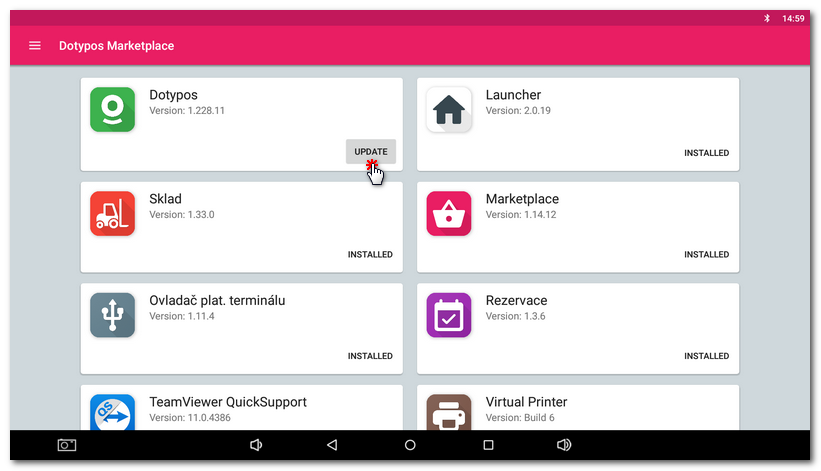
After connecting the cash register to the internet, open Dotypos Marketplace and update the cash register applications to make sure you are using the latest versions. |

|
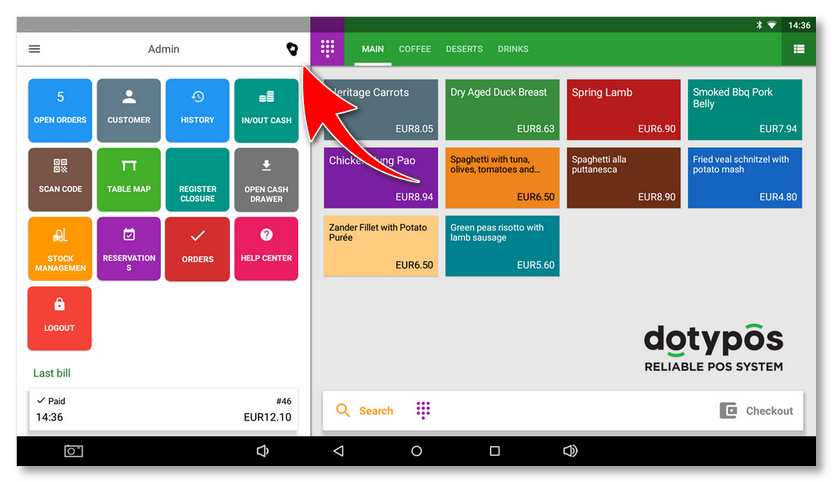
Leave the cash register on until the cloud on the main screen stops spinning. This indicates that synchronization with Dotypos cloud is in progress. |

|
If the cash register has not been in operation for more than 14 days, a warning about unverified licence may appear when the cash register is switched on. This is normal behaviour. If the cash register is indeed connected to the internet, the license will be verified within about 1 minute and the warning will disappear. Alternatively, you can tap the corresponding button in the dialog to verify the license immediately. |

|
Before going live, test that card payments are working. After reconnecting your business to the network, the IP addresses used by the cash register and payment terminal or other peripherals for communication may have changed - see network requirements. We also recommend always performing a test sale before going live, so you can be sure all other cash register devices and peripherals are functioning as they should. |

|
You can find all information about online payments / card payments in Dotypos, including the procedure to connect the payment terminal or Mobile Waiter with the cash register, in the chapter How to handle card payments? |