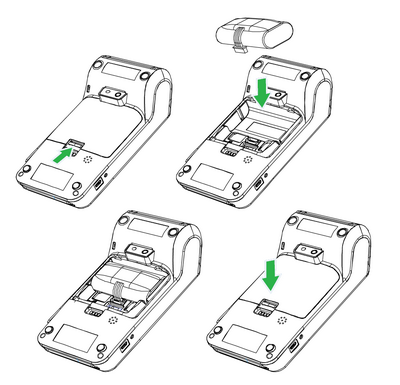
If the battery is not inserted in the device, proceed as follows:
1.Turn the device over and open the battery cover.
2.Connect the battery with the connector.
3.Insert the connected battery into the device and close the cover.
Charging the battery
1.Connect the power adapter to the micro USB connector at the left side of the terminal.
2.Connect the power adapter to the grid.
Charging is indicated by the LED diode on the upper side of the device. Red indicates charging. Once the LED diode turns green, the battery is fully charged.
