Discount groups are used to assign a permanent discount to customer orders. You can create as many discount groups with various discounts as you wish. Name each discount group and enter the percentage of discount. If the customer has a discount group assigned, the set discount will be automatically applied to each item in the order you assign to this customer.
Discount groups can also be managed through the Remote Management web interface.
How do I create and apply a discount group?
|
In Discount groups click on + CREATE DISCOUNT GROUP |

 . This will open the dialog to create a new discount group.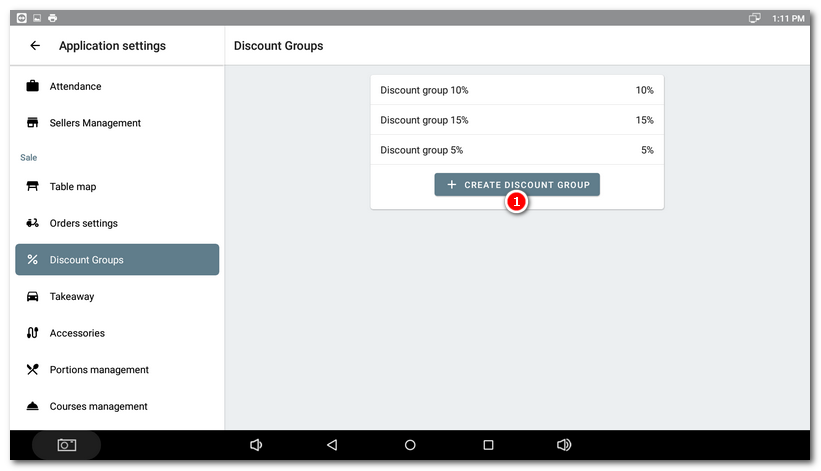
|
Use the field |

 to enter the discount group name and the field
  to enter the number to represent the discount percentage (e.g. for a 10% discount, enter the number 10). Keep the option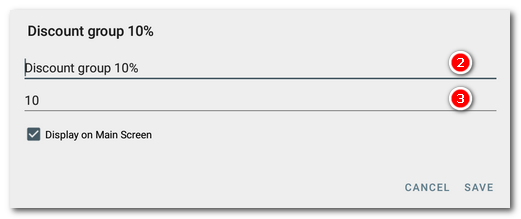
|
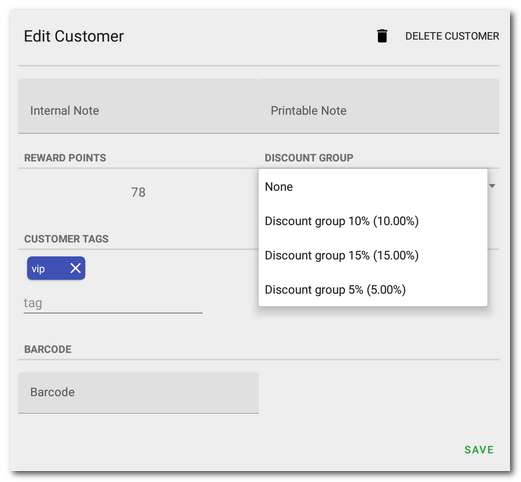
Now the discount groups will be displayed among customer order properties. Here you can choose the discount group from the pull-down menu and assign it to the specified customer. |

|
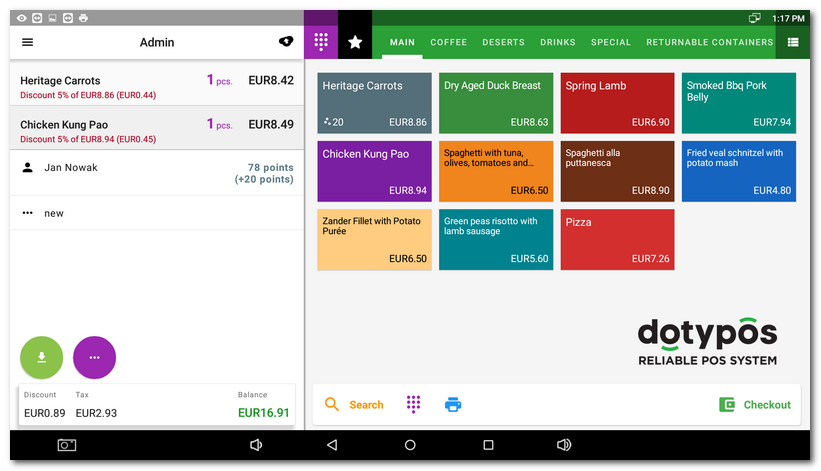
Once you have assigned the customer to the order, the discount from the relevant discount group will be applied automatically. |

|
Discount groups that have been created cannot be deleted on the cash register. To hide a discount group you no longer want to use, deactivate the Display on Main screen option. Alternatively, overwrite it with another discount or delete it using Dotypos cloud. |

