|
•Always switch off the device before inserting the cards! Inserting a card into a switched on device permanently blocks the device, which is not covered by the warranty! •We also recommend disconnecting the battery and reconnecting it after inserting the SIM card to be on the safe side. •When inserting or ejecting the cards, do not use any metal (conductible) or sharp objects. If you accidentally short-circuit or damage the contacts in the slots, the terminal will be permanently damaged, which is not covered by the warranty! |

Inserting a SIM / PSAM Card
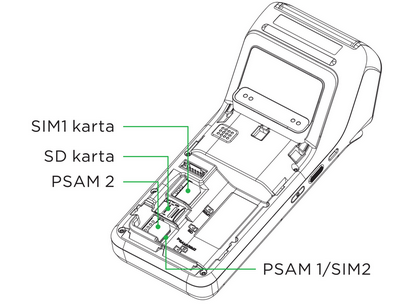
•Before removing the battery cover, switch off the device. The SIM card slot is located inside the device under the lower battery cover, as are the PSAM1 and PSAM2 slots. Each slot is labelled.
•The appearance of the SAM and SIM slots is the same. There are two slots for SIM and SAM cards.
•The terminal supports only one SIM card size: micro SIM, which exactly fits the size of the slot in the device. Do not insert SIM cards of other sizes into the terminal!
1.Switch off the device and turn it with the back facing up.
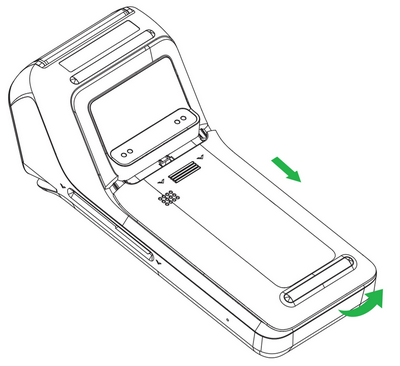
2.Slide the battery cover downward to release it.
3.Disconnect the battery connector and remove the battery from the device.
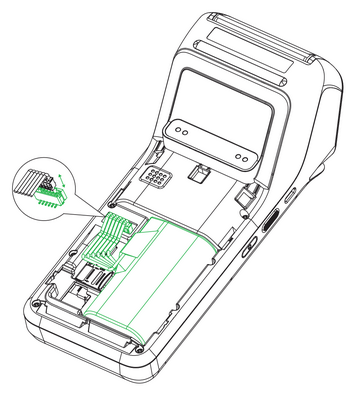
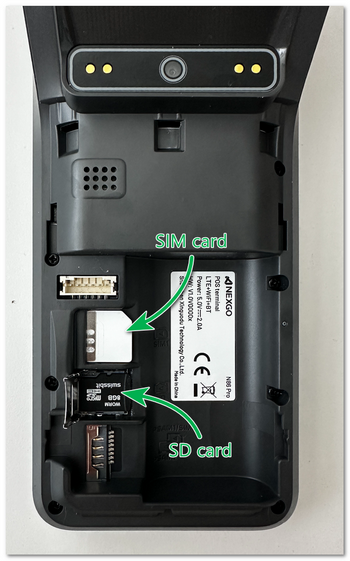
4.Insert the micro SIM card into the slot labelled SIM1. When inserting the cards, make sure that you insert them into the slots in the correct orientation according to their beveled corner (contacts facing down). Insert only cards of the correct size that fit the slot exactly. Never leave a smaller card in the slot. It could get stuck and damage the device.
Click for a larger image...
5.Reconnect the battery connector and insert the battery into the device.
6.Replace the battery cover.
Correct Insertion of the SIM Card
Click for a larger image...
|
If you are inserting only one PSAM card, we recommend inserting it into the PSAM1 slot. Likewise, if you are inserting only one SIM card, always insert it into the SIM1 slot. |

