Sales
Click on Sales reports and then from the pop-up menu select Sales. You will reach the page with sales overviews from all cash registers. By default the sales are divided by days. Each item is marked to show whether it was recorded in the EET mode or not.
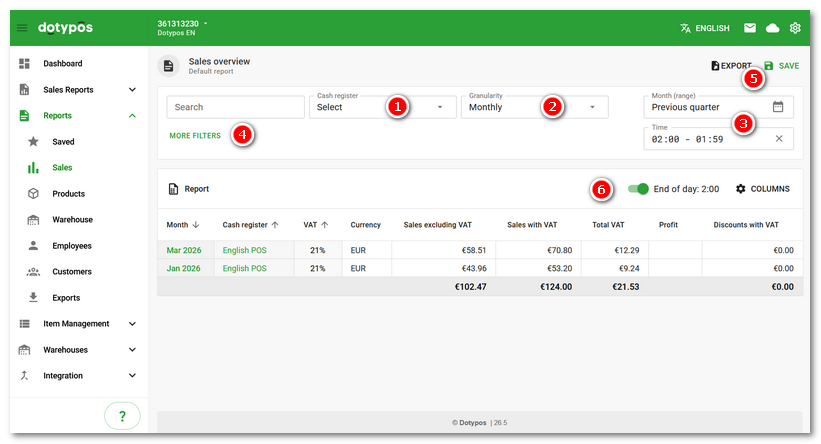
•The report shows sales by month and all cash registers by default. You can limit the overview to selected cash registers only by using the drop-down menu Cash register  . Use the menu
  to set the grouping according to the selected period. The specific date from to can then be selected in the calendar
  and you can also set here the time range of the displayed data. If you set the end time to, for example, 23:59, all entries up to 23:59:59 will be displayed. If you enter the time 00:00 - 23:59, entries from 00:00:59 to 23:59:59 will be displayed.
•By clicking on MORE FILTERS  you can filter the report according to other criteria. For example, display the sales of only a selected employee or customer. The COLUMNS
  then allow you to add more columns to the report, change their order and remove them if necessary. The order of the so-called grouping columns then determines the form of the report, or tells by which data the report should be grouped. The Reports chapter shows how to work with reports.
•Once you have set up the report to your liking, you can save the settings  and create your own report. Saved reports can be found under the Reports » Saved reports tab. The data export takes place immediately, so you must always wait for the save file dialog to appear. Depending on the settings of your browser, the exported file can be saved directly to the Downloads folder or another folder.
•In the header , you can activate custom end of day.
|
The sales overview can also be displayed directly in the cash register in the Sales overview. |

How does Dotypos calculate profit?
If 10 of a product are stocked in at a purchase price of 10 EUR and another 5 of the same product at 5 EUR, the purchase price for this product is calculated with the formula below:
total warehouse value (125 EUR) / total amount in warehouse (15) = 8,333 EUR
So 8,333 EUR is the average purchase price for one product. The cash register then calculates the profit as the sum of these average purchase prices minus sales:
Sales price - Average purchase price = Profit
