 Reservation is a stand-alone application for creating and summarizing table reservations. The created table reservations are displayed in a well-arranged easy calendar. First, install Reservation on the touch cash register by using the application Dotypos Marketplace. It is an easy and well-arranged reservation system that is fully capable of replacing paper books.
|
Table reservations can also be managed via the Dotypos cloud web interface. You can find more information about this option in this chapter. |

To grant the application Reservation access to the records in Dotypos, you have to authorize it first. After running reservations for the first time, tap the displayed button REQUEST DATA ACCESS and grant (confirm) the required permissions for the application.
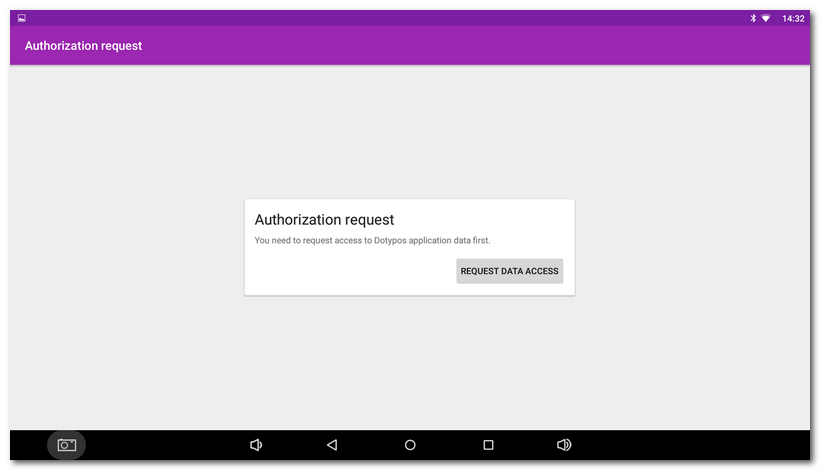
From now on, in reservations there will be displayed tables from the Table Map in Dotypos and other information important for reservations, e.g. Customer accounts.
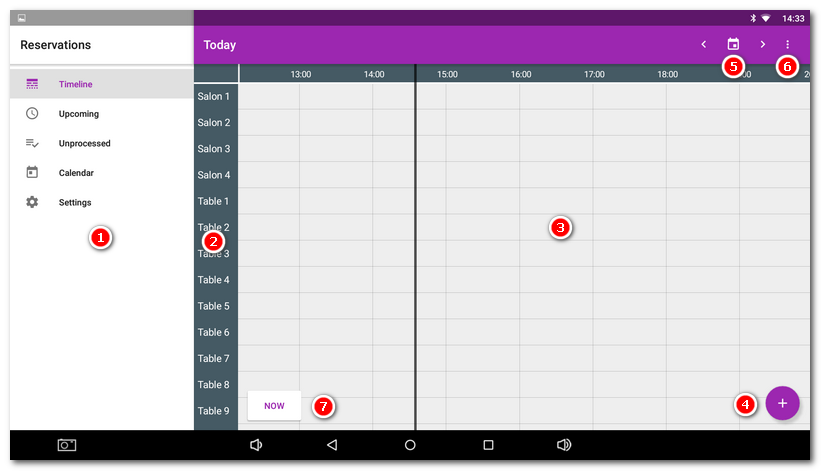
The initial screen is the Timeline, where you get a very clear view of individual reservations and their distribution over time. Now the overview will be empty.
|
Switching views: most recent reservations/unprocessed reservations (not used yet)/Calendar (view day by day)/ Application settings |
|
List of tables: By default are displayed tables from all cash registers connected to the same cloud. In the application settings, the displayed tables can be limited to a specified cash register. |
|
Reservation spread over time: rows stand for tables, columns stand for time from - to. |
|
Button for a new reservation. |
|
Buttons for going to the next or the previous day or a particular date selection. |
|
After clicking this icon, you can switch the overview display only to tables with created reservations. |
|
Button to switch to the actual date and time. |


You can find the information on how to create or remove a reservation in the next chapter.
|
Reservation can be used without restrictions if you have the license Dotypos UNLIMITED. With the license EASY you get 100 reservations per year, while the license Dotypos FULL allows 1,000 reservations. |

