» Available only in Dotypos FULL and higher. « |
|---|
Each touch cash register has its own default warehouse that is synchronized with Dotypos Cloud. In Dotypos Cloud you can create more warehouses. Each created warehouse is assigned to one or more cash registers. So you can create shared and subsidiary warehouses.
How do I create a new (shared) warehouse?
|
In Dotypos Cloud, click on the tab Warehouses and from the pop-up menu select Warehouses settings. You can display the properties for the created warehouse with the button |

 and you can adjust them there. To create a new warehouse, click on the blue button
  . To delete the created warehouse use
  . However, you can only delete warehouses not used by any cash register, so not the default ones.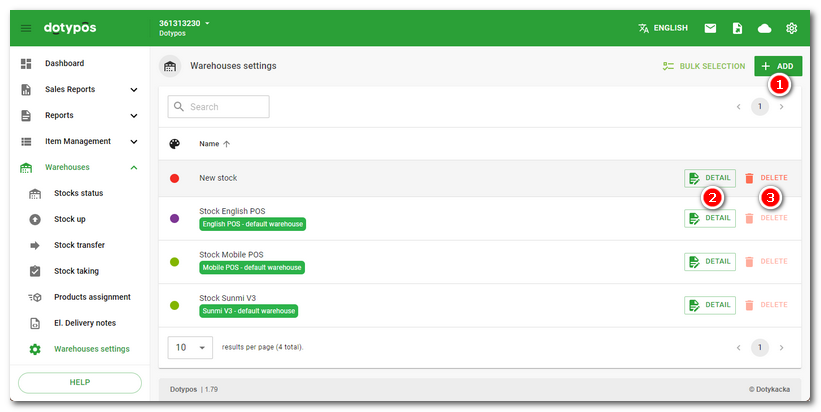
|
In the field The button in the heading |

 . This procedure makes the created warehouse accessible for individual cash registers. Now you have to select this warehouse for individual cash registers in the
  takes you to the page for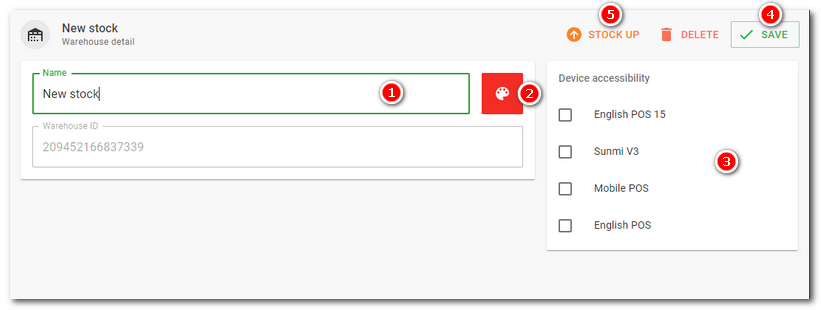
At the next synchronization the warehouses will be copied to individual cash registers. Warehouses created in Dotypos Cloud should correspond with the status of warehouses in the application Warehouse in individually assigned touch cash registers.
If you have created several warehouses, you can set which products will be stocked out from which warehouse. The rules for your own stocking out of products can be created in Product assignment.
|
You always also see the default warehouse in the list of warehouses. This warehouse is created automatically and used as the default for each touch cash register. If you want to use the newly created warehouse as the default, you must also always change the default warehouse locally – directly in the cash register. |

