clip-2026-11-03 at 16.47.30
A non-fiscalized order can be fiscalized later in the History within the EET 2.0 sales registration. Additional fiscalization is possible if the order was issued as non-fiscalized due to an error, e.g. in the internet connection.

 

How do I fiscalize an order later?

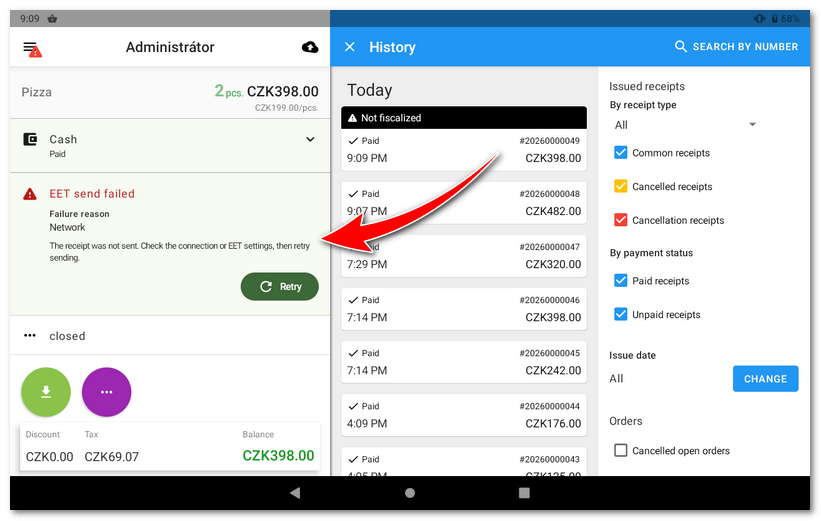
In the History, select the non-fiscalized order and tap the Retry button on the left.
clip-2026-11-02 at 22.05.17


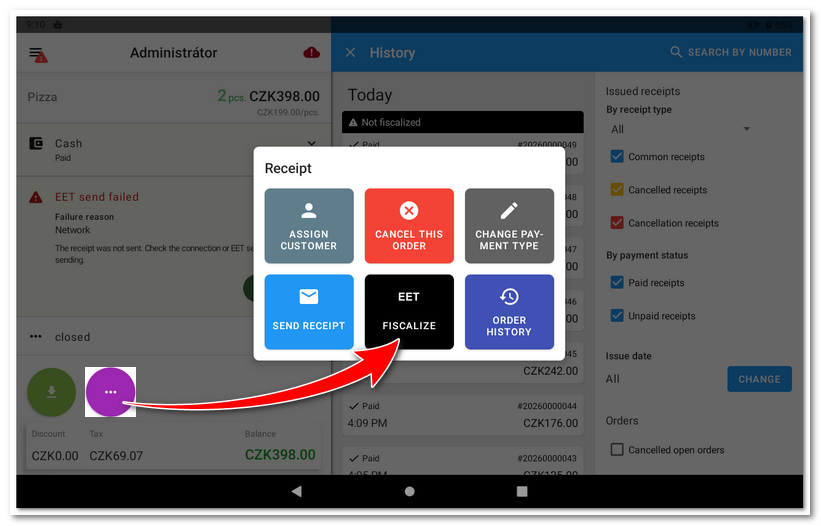
Or open the Order options menu and select FISCALIZE RECEIPT.
clip-2026-11-02 at 22.11.09

top

This manual is for informational purposes only and provides no warranties. The specifications given are subject to change without prior notice. Images and diagrams are for illustration only. The appearance and functions of the devices and software may differ depending on the current version of the product and applications.
Created with ♥ by Dotypos. ©2026 Dotykačka ČR s.r.o.