
Chapters related to EET 2.0 are marked with the EET 2.0 logo on the right, just like this chapter. So if you find the logo in a chapter, it means that the described function or operation affects EET 2.0 or contains certain fiscalization settings. Clicking the logo usually takes you to the relevant function.
|
The update that includes the EET 2.0 mode is supported on cash registers running Android version 5.1 and higher (cash register type DOTPO1411 and higher). However, we recommend replacing cash registers with this system version with current cash register models, as they have reached the end of their life cycle and are already lagging behind in performance. At the same time, their support will end at the end of 2027, which means that after this date it will no longer be possible to install any further updates of the cash register applications on these devices. |

|
|

Important dates
•1. 11. 2026 – The Financial Administration made it possible to create record-keeping units and generate certificates.
•1. 1. 2027 – EET 2.0 starts. During January, EET 2.0 will run in pilot mode, but it will already be standard sales registration.
|
•You can find information about EET 2.0 on the Financial Administration website https://eet.gov.cz. •The complete procedure in the MOJE daně portal (logging in, creating a record-keeping unit, creating and downloading a certificate) is described by the Financial Administration here. |

EET 2.0 activation procedure and related information
1.Check that you have the current version of Dotypos on the cash register
2.Generate a certificate on the Financial Administration portal and upload it to the cash register
3.Check that sales on the cash register are fiscalized correctly
4.Video: Logging in to EET 2.0 and generating a certificate step by step (in Czech)
5.Video: Complete procedure, including uploading the certificate to Dotypos (in Czech)
How do I set up EET 2.0 in Dotypos?
|
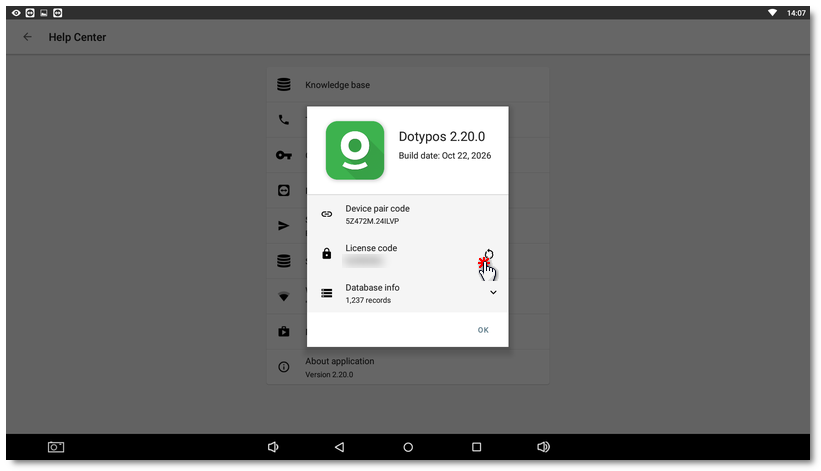
Check that you have the current version of Dotypos on the cash registerThe live EET 2.0 mode is added to cash registers as part of a standard update of the Dotypos application. If the cash register is continuously connected to the internet, it updates automatically. So first check that you have the current version of the Dotypos application on the cash register. The version should be 2.19 or higher. You can find the version of the Dotypos application under the Help Center tile on the main screen. |

|
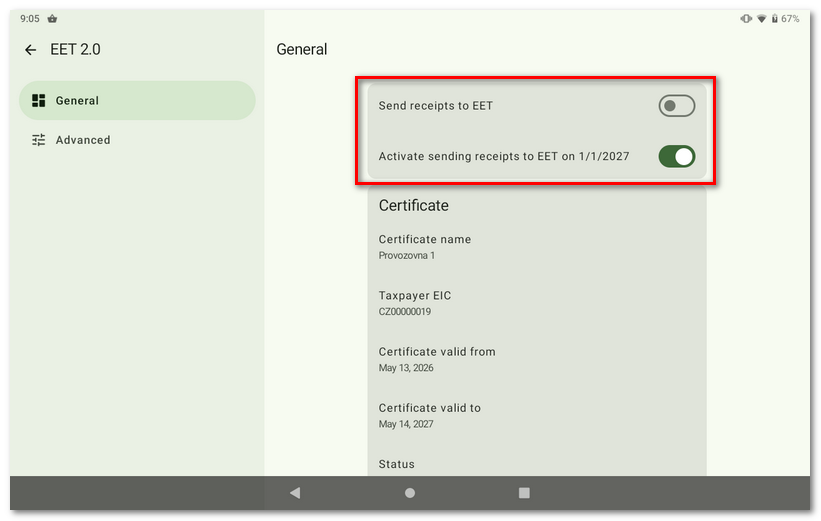
Generate a certificate on the Financial Administration portal and upload it to the cash registerLog in to the Financial Administration portal MOJE daně, create a record-keeping unit and download the generated certificate to your computer. You then simply upload the certificate from your computer to the cash register via the Dotypos cloud. The whole procedure is shown step by step in the chapter Generating a certificate and uploading it to the cash register. If you do everything correctly, sales registration on the cash register will be ready for the beginning of the year. Depending on when you upload the certificate to the cash register (before 1.1.2027 or later), sending sales from the cash register will either be set to activate on 1.1.2027 or will be active immediately. So you can upload the certificate right now and registration on the cash register will start automatically later. |

|
If you upload the certificate to the cash registers before 1.1.2027, EET 2.0 will be set up in the cash register so that the cash register automatically activates sending receipts only from 1.1.2027. If you upload the certificate after 1.1.2027, sending of sales will be active immediately. We therefore do not recommend changing the Send receipts to EET setting on the cash register. Keep the default setting, in which the actual fiscalization (sending of receipts) starts automatically from 1.1.2027. If you turn sending on now, unsent receipts will remain in the cash register and the cash register will report an error, because the production servers of the Financial Administration are not running yet. |
|
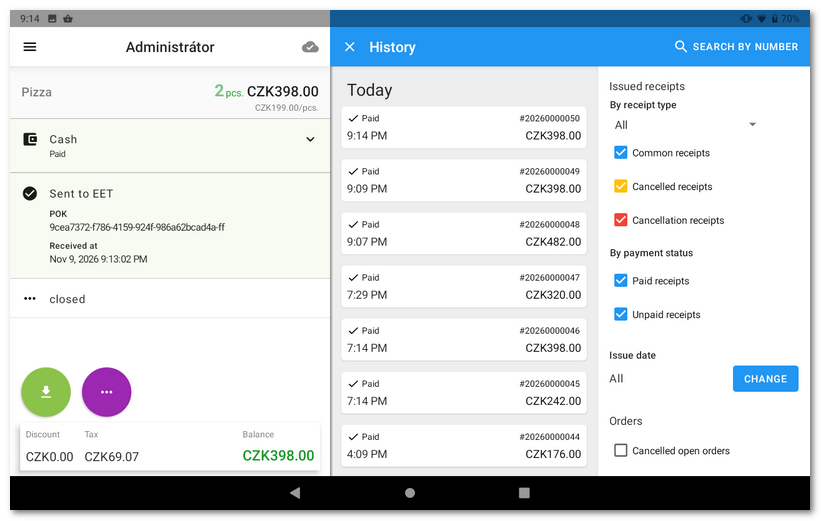
Check that sales on the cash register are fiscalized correctlyFrom 1.1.2027, the cash register will fiscalize all closed orders as standard and send them to the Financial Administration servers. You can check that fiscalization works in several places: 1.In the Dotypos side menu, where the current status of sales registration is displayed. 2.In the History by tapping the selected order. 3.In the Dotypos cloud in the Issued receipts report. |

|
In the event of technical problems, unsent sales must be sent again within 48 hours. Once the problem is resolved (e.g. the internet connection is restored), you can send the sales from the cash register again via the side menu. The cash register also tries to send the sales automatically approximately every 30 minutes. If a registration outage is caused on the Dotypos side and cannot be resolved within 48 hours, you will subsequently receive a confirmation from us of the total duration of the outage. You can use this confirmation in any contact with the Financial Administration. If the cash register does not work for any reason, record the sales separately and, once the cash register is working again, register each of them individually. Bulk subsequent registration must be permitted by the Financial Administration. |
Once fiscalization is set up correctly and verified with a test sale, see the next chapter for the fiscalization options offered by the cash register.
 Video: Logging in to EET 2.0 and generating a certificate step by step (in Czech)
Go to the video on YouTube and set up automatic translation of the subtitles into English.
Video: Complete procedure, including uploading the certificate to Dotypos (in Czech)
Go to the video on YouTube and set up automatic translation of the subtitles into English.