How to set up the checking or recalculation of the product margin during stock in?
Dotypos allows you during a product stock in to check and automatically count up the previously set specific product margin.
|
How does Dotypos calculate the purchase price?  Note: Dotypos does not use FIFO to calculate the purchase price. |

|
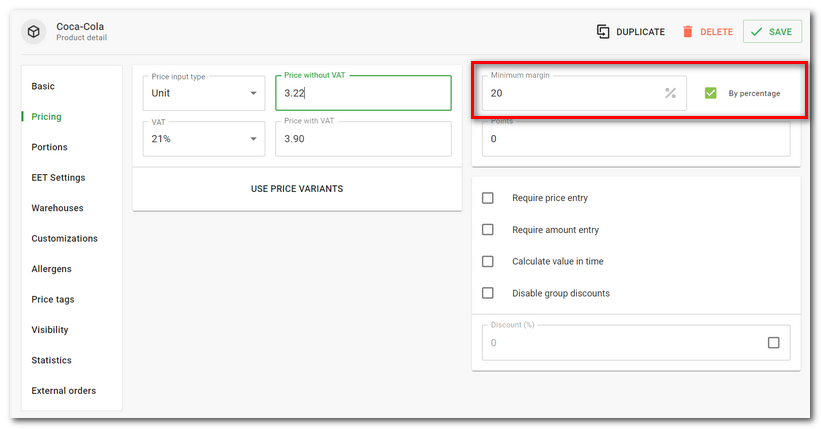
First, set the margin for the selected product in product details. The margin can be defined as a value in currency or in percent. You can choose in which form you enter the margin. If you enter it as an absolute amount as profit, the margin value will be calculated as a percentage and vice versa. Save the product with the set margin. |

|
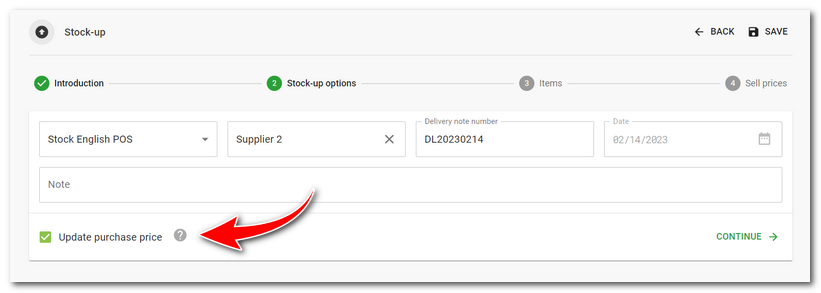
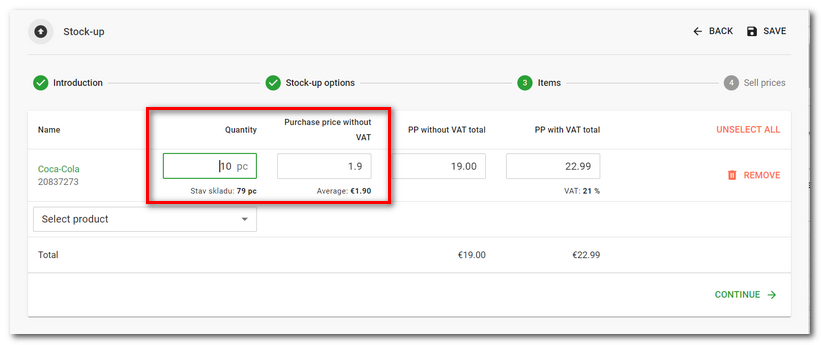
When stocking, leave the Update purchase price option active. In the next step, add the quantity of products to be stocked and enter their purchase price. |

|
In the third step, based on the completed sales price, you will see the corresponding profit and margin. The arrows then indicate whether the profit and margin are lower, the same or higher based on the weighted average of the previously entered prices. If the margin is lower than that set for the product, a warning will be displayed. By tapping RECALCULATE SELLING PRICES |

 the sales price will be adjusted to match the margin set for each product.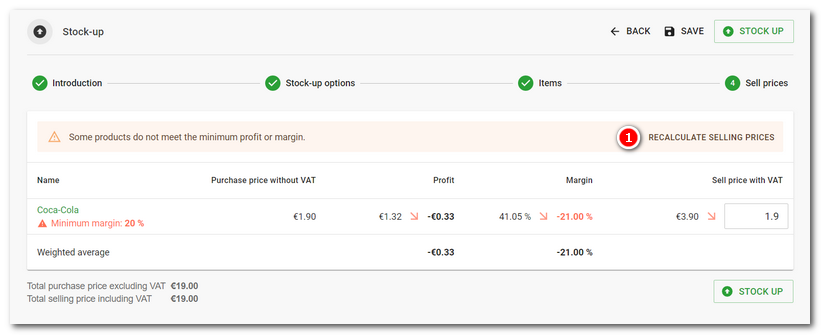
|
The margin used for stocking in products can be also set for the whole category. For an overview of the set margins, use the stock data report Margins & Profit. |

