
|
How many certificates do I need?When considering how many certificates you need, keep in mind that in the future you may need to invalidate a certificate in the MOJE daně portal for various reasons. If you have only one certificate, invalidating it will block sales registration on all cash registers where it is used. It is therefore better, for example, to use the first certificate for the cash registers in one establishment and the second certificate for the cash registers in another establishment. One establishment, multiple cash registersDo you have multiple cash registers in one place, for example a bar and a cash register in the garden? One certificate and the same record-keeping unit are enough, because all cash registers are in the same establishment. Multiple branchesDo you run multiple branches, for example two cafés in different parts of the city? Then it is up to you whether you use one certificate for all of them or a different one for each establishment. However, you always fill in the record-keeping unit for each cash register according to the establishment where the cash register is located. Multiple businesses on one cash register (independent sellers)Do multiple businesses work on one cash register? Typically, this is e.g. a salon where each hairdresser has their own company ID. In this case, each business generates its own certificate in DIS+ and you then upload it to the specific seller in the Dotypos cloud: •In the Dotypos cloud, on the Cloud settings tab in the EET 2.0 section, you will see the independent sellers under each cash register. •In the row of the given seller, click the UPLOAD button. •Upload the seller’s certificate and fill in the record-keeping unit. Sales are then sent under the certificate of the seller who is currently logged in to the cash register. If a seller works at multiple branches, they can have a different certificate on each cash register. |

|
Do I always have to print a receipt for the customer?If the customer does not want a printed receipt, you do not have to print it. The receipt can also be sent to the customer electronically: 1.Optionally, create customer accounts in Dotypos, where each customer also has their e-mail saved. 2.Assign the customer account to the open order. 3.Send the receipt to the customer’s e-mail in the payment dialog. You can also enter the customer’s e-mail here manually. 4.Automatic receipt printing can be turned off on the cash register in the print job Receipt printing in the print settings. You can find more about the receipt printing options in Dotypos in this chapter. |
|
How do I set up the network in the establishment for EET 2.0 to work correctly?All requirements for the network and internet connection for the Dotypos POS system, Dotypay payment terminals and EET 2.0 are described in this chapter. |
|
What if I issue / close an order on the cash register by mistake?Proceed in the same way as without electronic sales registration. Cancel the incorrectly issued order on the cash register and then issue a new one. When cancelling, a negative amount is registered as standard for the originally issued receipt, so the registered sales will match. In the cash register history, you can also subsequently change the payment method of a closed order, or fiscalize the order if it was not fiscalized online, e.g. due to a temporarily non-working internet connection. However, changing the payment method from fiscal to non-fiscal and vice versa will no longer affect the sale already sent. This option is therefore only used for correct records in the cash register. |
|
Can I issue a non-fiscal receipt?In certain specific cases, you can issue a non-fiscal receipt, for example if a customer bought goods in an e-shop, paid for them by bank transfer and brings them to the establishment to return them. You can record the refund in cash or to the customer’s payment card on the cash register as non-fiscalized. However, if you fiscalize it, it does no harm. This "sale" is not paired with anything at the Financial Administration. Keep in mind, however, that if you deliberately close an order on the cash register without fiscalization, it will remain recorded that way in the cash register. In this case, it can no longer be fiscalized retroactively. |
|
What should I do in the event of a temporary internet / network connection outage or another problem?Continue to use the cash register as usual and bill without restrictions. Closed orders are saved in the cash register and are automatically sent to the Financial Administration server within a few minutes after the connection is restored. In the event of technical problems, unsent sales must be sent again within 48 hours at the latest. Once the problem is resolved (e.g. the internet connection is restored), you can also send the sales from the cash register again via the side menu. If a registration outage is caused on the Dotypos side and cannot be resolved within 48 hours, you will subsequently receive a confirmation from us of the total duration of the outage. You can use this confirmation in any contact with the Financial Administration. If the cash register does not work for any reason, record the sales separately and, once the cash register is working again, register each of them individually. Bulk subsequent registration must be permitted by the Financial Administration. |
|
How does EET 2.0 work with sales at authorization?If you register sales on behalf of someone who has authorized you to do so, you do not need a new certificate. The sales are registered under your certificate and the EIC (EIČ) of the person who authorized you is sent with them. EIC is a registration identification number. According to the law, it is the tax ID (DIČ), birth number or an identifier assigned by the Financial Administration. The authorizing subject must provide you with the EIC. If the EIC is missing, you will be alerted by an exclamation mark in the tab panel 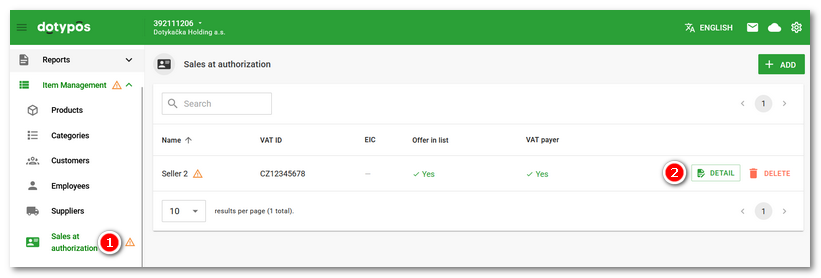 |


|
What data is sent to the Financial Administration server?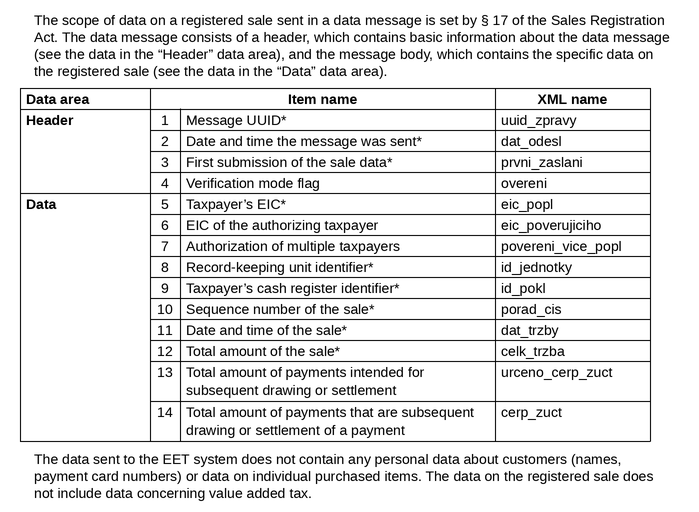 |