» Release date: 3.8.2026* « |
Improvements:
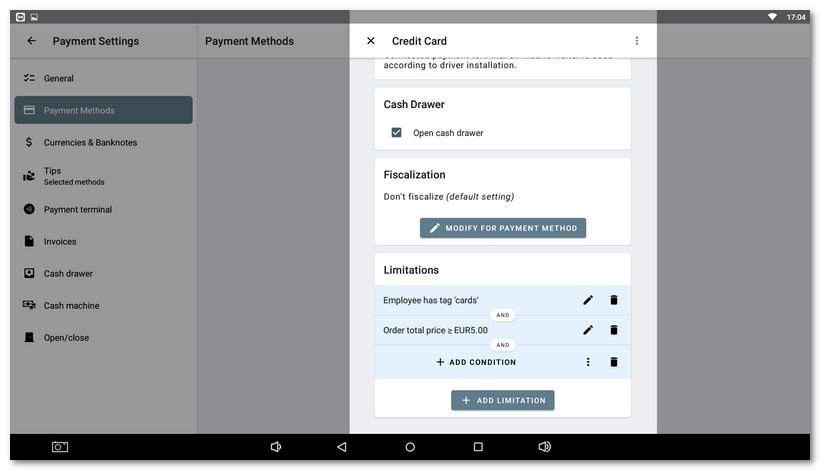
•Option to configure available payment methods for staff and define additional conditions for the availability of individual payment methods:
•Added automatic closing of the keyboard when moving to the next step in the activation wizard.
•Added automatic customer age verification based on the date of birth in their customer account.
•Extended entry of weighted EAN codes in the product properties. Required zeros for the correct format are now filled in automatically.
•Added a confirmation dialog for canceling an order from ordering services.
•Prevented changing the unit group for a product with Ingredients.
•Reworked the dialog when deleting a customer account with the option to delete only the account itself or delete the account including anonymization of personal data.
•Changed the icons of the Send button in the payment dialog and the print button for the open order statement.
•Mobile Waiter extended with the option to display prices in a VAT-exclusive mode.
•Added saving of the zoom level of the table map to the user settings in Mobile Waiter.
•Increased the font size of the current value in the dialog for changing the quantity and price of a billed product in Mobile Waiter.
•Added support for a customer display for the new 15" cash register (Sunmi D3).
•For third‑party integrations, added the option to enter the number of guests into POS actions.
•Added a Ukrainian translation of the application.
•Added external order identification for ordering services and removed the “beta” label.
•Preparation for a future complete history of cash register operations: creation of order snapshots.
Corrections:
•Fixed recorded issues across Dotypos app causing application crashes.
•Fixed disappearing customer after merging orders.
•Fixed incorrect user logout when scanning the customer’s QR code.
•Fixed broken appearance of the table detail in Mobile Waiter.
•Fixed the function of opening the cash drawer when printing fiscally from Mobile Waiter.
•Fixed an error when finalizing an order with card payment in Mobile Waiter.
•Fixed incorrect price in search caused by the packaging price.
•Fixed the visibility of the customer button in Mobile Waiter according to the configured permission.
•Fixed inconsistent behavior of parking buttons and POS actions with “manual-price”.
•Fixed top-up of customer credit via the linked payment terminal.
•Fixed overlapping of content by the status bar on the Dotypay Nexgo N86 Pro device.
•Fixed deleting a note and spelling in an open order.
•Fixed the pairing wizard with the cash register in Mobile Waiter.
•Prevented automatic adding of the internal printer on the 10" cash register (DOTPO 1012).
•Fixed overlapping when entering labels in display settings.
•Fixed a spelling mistake.
•Fixed entering labels when editing courses.
•Fixed displaying an item with a long name on the order in Mobile Waiter.
•Fixed various recorded issues related to working with an order in Mobile Waiter.
•Fixed user permission behavior in Mobile Waiter.
•Fixed printing of the delivery time for Foodora pre‑orders.
•Fixed handling of orders from ordering services that were completed on the service side.
•Prevented sending a request for tips to the Dotypay payment terminal if tips are disabled.
•Fixed saving of the product value for requiring price entry.
•Prevented incorrect editing of stock movements when processing an electronic delivery note.
•Adjusted the HTML format of the e‑mail receipt.
•Fixed the function for the 80 mm Rongta printer RP337 SETUP UNCOLLECTED PRINT ALERTS, which did not work when a new printer was added.
•Fixed completing an order as unpaid when entering zero in the dialog for entering the paid amount – a zero value can no longer be entered.
•Fixed unwanted screen shift when returning to the category list in the simplified cash register mode.
•Removed the 100% discount limitation.
•Fixed an error when generating a PDF invoice in VAT non‑payer mode.
*The new version is distributed to individual cash registers gradually. The update may therefore appear on your cash register with a delay of several days compared to the release date.
