» Release date: 21.10.2026* « |
Main new features
•New form of returnable (deposit) containers
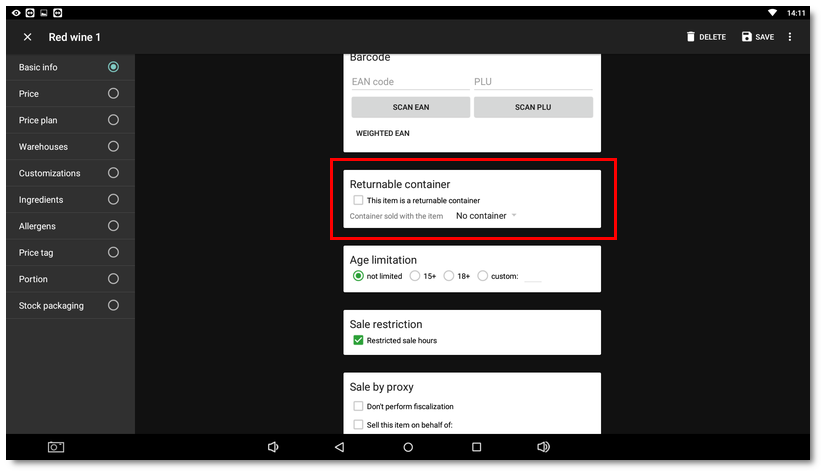
A returnable container is now assigned directly to the product in its properties, by selecting from items / products with the This item is a returnable container attribute. During the sale, the selected container is then added to the order automatically, even when the quantity of the sales product is increased in an open order or for customization items.
•Blocking the sale of selected items at a specified time
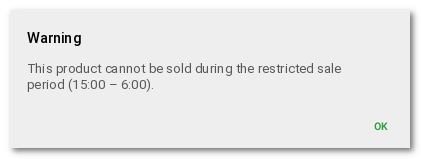
In the Dotypos Application settings - Cash register, in the General section, you can enable blocking the sale of selected items within a set time interval. The default interval is from 22:00 to 06:00. It can be adjusted according to local rules, e.g. a night-time ban on the sale of alcohol in some countries. Blocking the sale during the set interval depends on the Restricted sale hours option being enabled in the properties of the product or category. In the case of a category, the sale restriction then applies to all products in that category. During the set time, the cash register will not allow these products to be billed and will display a warning.
•Quantity of customization items
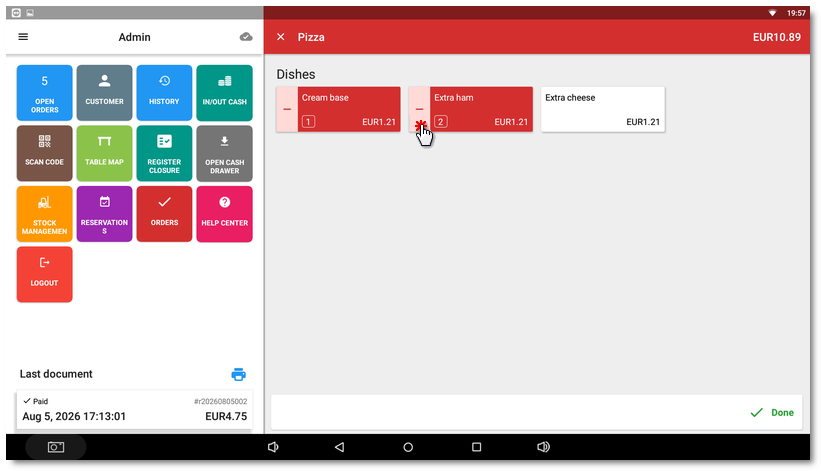
On the customization selection screen, you can now increase or decrease the quantity of customization items in the order by tapping, just like in the Mobile Waiter.
•Card payment in a foreign currency
The new payment method Credit Card (alt. currency) allows you to accept a card payment in a foreign currency via a connected Dotypay payment terminal, if the terminal is approved for sales in another currency. After selecting this payment method, the cash register offers the configured foreign currencies. If the cash register has only one foreign currency set, the payment is processed directly.
•Bolt Food (cash) payment method
For Bolt orders entered into the cash register manually, without an active integration with the ordering service, a new payment method Bolt Food (cash) is available.
•Default tare for a product
You can assign a default tare to a product with the special tag -tare-default-<weight in kg>, e.g. -tare-default-0.200. The tare is then selected automatically when weighing. However, it only works with an active non-certified scale connection.
•Weighing in the Mobile Waiter
The Mobile Waiter supports the sale of weighed products. The weighed quantity and the corresponding price are transferred from a scale connected to the Mobile Waiter device with a USB cable.
•Delivery address for orders with own delivery
For a new order from ordering services with own delivery, the delivery address is displayed before confirming the order on the cash register, so that the preparation / delivery time can be estimated.
•Barcode reader on Dotypay NEXGO N86 Pro
The integrated camera of the Dotypay payment terminal on the Nexgo N86 Pro device, launched by the configurable blue / green button on the left side of the device, transfers scanned barcodes directly to the cash register.
•Displaying product tiles in one column
In the Display settings, you can select a view with one column of products on the main screen for both the cash register and the Mobile Waiter. This is suitable for mobile devices with a portrait display.
Improvements
•Cash register self-service mode – The side panel offers only the current user and logout, so the customer cannot access the Help Center or the cash register settings. During a card payment, the transaction can no longer be interrupted by manually issuing the receipt.
•Write-off – When issuing a receipt with the Write-off payment method, kitchen orders (tickets) for the written-off items are never printed.
•Customer points – Points are not saved when selling without an assigned customer.
•Discount groups – The discount is limited to a maximum of 100%.
•License – The separate License screen has been removed. The license can be verified in the About application dialog. For the trial version of Dotypos, you enter the license key in the Application settings.
•Issuing a receipt / closing an order – If issuing fails, an error message is displayed instead of endless loading.
•Card payments via a connected payment terminal – The payment result is passed to the cash register even if the terminal driver terminates during the payment.
•POS Actions – The Takeaway mode can be set for an open order; a new action for printing custom data (plain text, ESC/POS) on the default receipt printer; order/* actions can also be called from the local network.
Corrections
•Foodora – For a pre-order, the time for which the customer ordered is printed; for a regular order, the courier pickup time is printed.
•Delivery orders – If the connection drops during confirmation, the order is not closed until the order is also confirmed with the ordering service.
•Dotypay payment terminal – Tip entry on the terminal is also displayed for a split payment.
•Open orders – Changes made to a reopened order are not lost after it is parked again; the order is assigned to the staff member who last edited it.
•The Mobile Waiter notifies you of an open order of the selected customer, just like the cash register.
•Cloud synchronization – The cloud icon on the main screen always shows the current synchronization status and does not get stuck, e.g. after the display is locked.
•Register closure – Partially paid receipts are listed in the unpaid receipts section.
•The payment dialog does not close after a partial payment with a tip until the order is paid.
•Customer points – A partial cancellation of an order with points is no longer blocked by the points check.
•Attendance also starts when a user logs in with a chip.
•Warehouse – When selling a manufactured item with customizations, the customization items are also deducted.
•Dark mode – Fixed the display of restrictions in the payment method settings.
•POS Actions – A discount specified in the request takes precedence over the product discount, and an item discount over the order discount; fixed a server error after the order lock expired; the documented order/set-item-takeaway action works.
*The new version is distributed to individual cash registers gradually. The update may therefore appear on your cash register with a delay of several days compared to the release date.
